Webhooks can be found under Config > Webhooks. 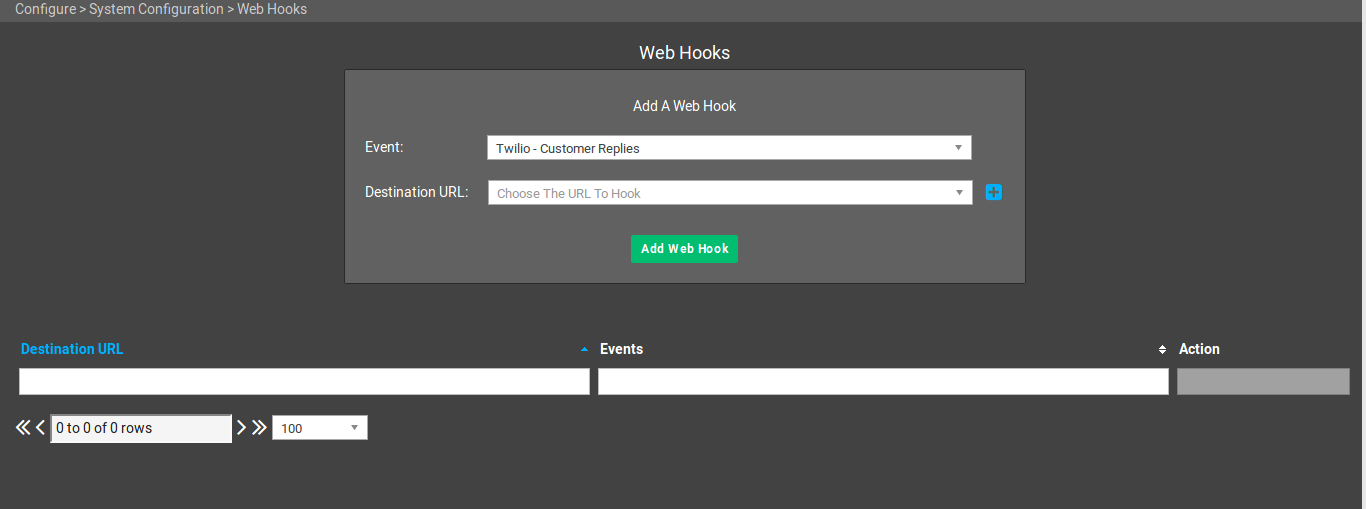 Webhooks allow Powercode to supply information to Slack and other external applications even without a specific integration. The data is sent via an HTTP POST in JSON format to the specified URLs an Event is linked to inside of Powercode.
¶ Permissions
| Permission | Why it is needed |
|---|---|
| Web Hooks (System → Configuration) | View access opens the page and lists your webhooks. Edit access shows the form for adding a webhook. |
¶ An Example Use Case
To send all incoming Twilio SMS messages to Slack, you would:
- Choose the send Event: Twilio - Customer Replies
- Click the + button next to Destination URL to add a destination URL.
- Select Slack as the Application Type.
- Enter a Destination Name, such as your channel name.
- Get a Slack channel URL by following the instructions Slack provides and enter it in the Destination URL field.
- Save the URL and click Add Web Hook.
Once this is set up a Slack notification will appear in the chosen Slack channel every time a customer replies to the Twilio SMS number. The slack notification will contain a link to the customer page, where the full SMS conversation can be read and replied to.
¶ Events added in 26.10.05
¶ Ticket Created In Group
Sends a message when a ticket is created with one of the responsible groups you choose. Use it to alert a team about new work, for example to post every new ticket for your installs group to that team's Slack channel.
- Choose Ticket Created In Group as the Event.
- In Event Options, choose one or more ticket groups.
- Choose a Destination URL, or add one with the + button, and click Add Web Hook.
The webhook fires when a new ticket's responsible group is one of the groups you chose. This covers tickets opened in the admin portal, the customer portal, by email or through the API, and tickets created from a ticket template, such as the ticket made after a customer signs up. A ticket created with no responsible group never fires it. To hear about existing tickets that are transferred into a group, use Ticket Added To Group instead.
What is sent:
- Slack destinations get a message headed Ticket Created In Group with the responsible group, the ticket summary (linked to the ticket), the description and the ticket number.
- Custom Application destinations get JSON with
eventset toTicketCreatedGroupExanddataholding the ticket's fields (such asTicketID,CustomerID,Summary,Description,ResponsibleGroupID,StatusandPriority) plusResponsibleGroupName.
Give Ticket Created In Group its own destination URL. A destination URL that is also linked to other events receives a copy of this message for each of those events.
¶ Customers who sign up on their own
There is no separate webhook event for self-registration. A customer who signs up through your customer signup form triggers Customer Account Created, the same as a customer added in Powercode, and Add/Update Customer Service for each service they chose. If your signup settings create a ticket, that ticket can trigger Ticket Created In Group. See Schedule Install & Custom Messages Configuration and System Emails.
¶ Documentation
Documentation on existing Powercode webhooks are stored here.
Don't see what you need? Send us a message at support@powercode.com and we might just be able to help you.